Certify Certificate Manager
Certify Certificate Manager is a Windows application and background service that automates the requesting, deployment, and renewal of SSL/TLS certificates from Let's Encrypt and other ACME certificate authorities.
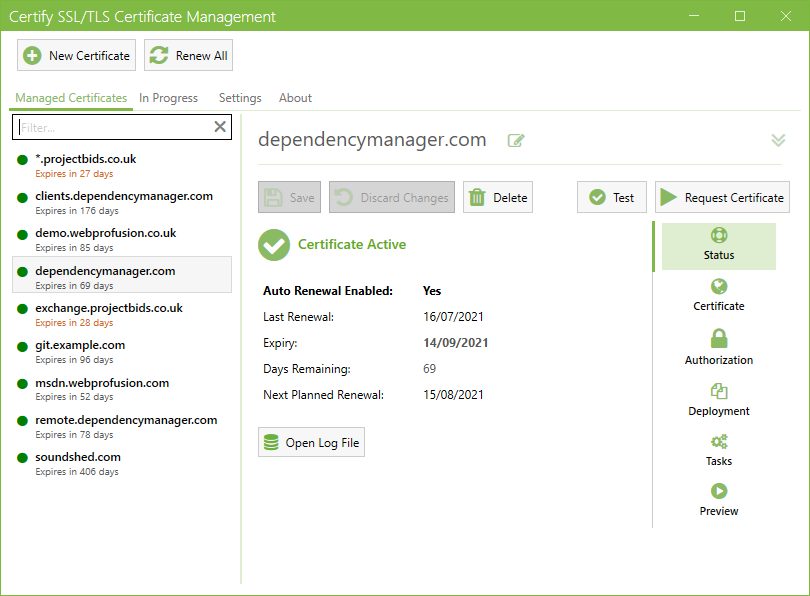
Core Capabilities
- Manage configurations via the desktop application, while a dedicated Windows background service handles scheduled certificate renewals.
- Automatically binds certificates to IIS websites, installs certificates directly to the Windows Certificate Store, or runs deployment tasks to export certificates for other local or remote services.
- Join your Certify Management Hub for extended functionality and multi-server administration and monitoring.
System & Domain Requirements
To use Certify Certificate Manager, your environment should meet the following conditions:
- Use a supported version of Windows ideally with outbound HTTPS access to contact your chosen Certificate Authority (public or custom).
- Install the software directly on the server hosting the target service, or use SSH/UNC shares etc to with deployment tasks to sync certificates to other destination systems.
- Ensure your target domains are active and can complete either HTTP challenge validation (requiring port 80/443 access) or DNS challenge validation (requiring programmatic control or manual modification of your DNS zone).
- You must keep the software up to date. Certificate Authorities periodically change their services in ways that may become incompatible.
Quick Start: Requesting Your First Certificate
Setting up a managed certificate generally involves these steps:
- Install: Download and run the installer as described in the installation guide.
- Setup Bindings (IIS): If you are securing IIS websites, configure your hostname bindings in IIS Manager before beginning.
- Add Managed Certificate: In the Certify UI, click New Certificate and specify the domains you want to secure.
- Configure Challenge Validation: Choose a validation method (HTTP or DNS) and click Test to ensure path or DNS access is functional prior to placing the actual order.
- Preview: The Preview tab will show you details of the certificate being ordered and the deployment that will happen, including any matching IIS site bindings the cert will target.
- Request Certificate: Click Request Certificate to fetch and apply your certificate. Review the request and deployment flow to understand how the process executes.
- Automatic Renewal: Once a certificate is successfully requested, Certify's background service will schedule it for routine renewal checks. Learn how this operates in the renewal behavior guide.
Options for Larger Deployments
- Unattended Execution: The Windows background service runs continuously to manage periodic automated renewals even when no users are logged in.
- Automation Tasks: Extend your deployment pipeline with built-in deployment tasks, custom scripting hooks, or the command line interface (CLI).
- Centralized Administration: For coordinating across multiple servers or platforms, see the Certify Management Hub documentation.
Next Docs to Read
- Install and upgrade Certify Certificate Manager
- Request your first certificate
- Monitor renewals and alerts
- Troubleshoot common issues
- Browse all product and task entry points
info
Certify The Web is our range of certificate management products, including Certify Certificate Manager, Certify Management Hub, Certify Dashboard, and Certify DNS.