Get Started with Certify Dashboard
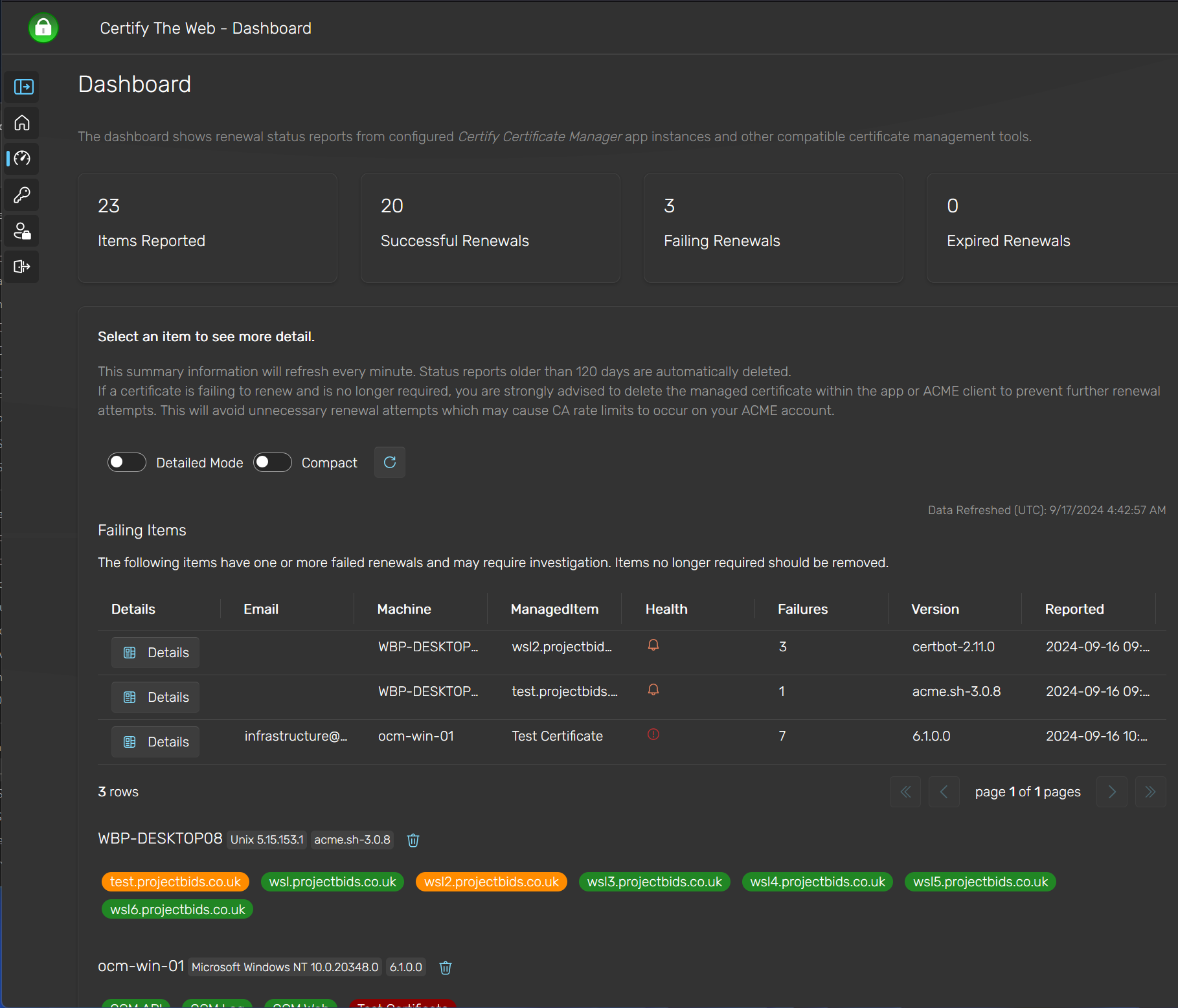
Certify Dashboard is our hosted service for monitoring certificate renewals across your organization. You can report to the dashboard using Certify Certificate Manager directly, or by using Certify Management Agent with supported ACME clients such as Certbot and acme.sh.
Best Fit
- You want centralized visibility into renewal success and failure across multiple servers.
- You need a simple hosted monitoring layer without fully centralizing certificate operations.
- You want to see certificate expiry risk and failure details without logging into each server.
Quick Setup
- If you use Certify Certificate Manager, enable dashboard reporting and choose Add to Dashboard from the start-up screen.
- If you use other ACME clients, deploy Certify Management Agent and manage that configuration from Certify Management Hub.
- Confirm that renewal activity appears in the dashboard after the next successful request or renewal.
Features
- Monitor successful and failed renewals.
- See warnings for items nearing certificate expiration.
- View failure messages directly without checking individual server logs.
- Report automatically from hundreds of servers, for thousands of certificates.
- Avoid unexpected downtime due to repeated renewal failures.
- Minimal configuration required.
Reporting to the Dashboard
Reports include a summary of the current certificates' public information and the most recent relevant error message from client logs for failed renewals. The reporting method varies depending on the ACME client software used.
Using Certify Certificate Manager
If you use Certify Certificate Manager, you can start reporting to the dashboard by launching the app and selecting the Add to Dashboard option on the start-up screen. The instance name will then appear on your dashboard, and any subsequent certificate requests or renewals will be reported as they occur.
Ensure that Status Reports to Dashboard is enabled under Settings in the app (enabled by default).
Using Other ACME Clients
To report to the dashboard from third-party ACME clients, you can use Certify Management Agent to monitor and report renewal status. The agent is a service that runs on your servers and understands the configuration of specific ACME clients. The agent configuration is managed using Certify Management Hub.
We currently support:
- Certbot
- acme.sh
- win-acme & simple-acme
- Posh-ACME
The agent is designed to run on Linux, macOS, or Windows.
Licensing
Certify Dashboard is included with license key purchases for Certify Certificate Manager, Certify Management Hub and Certify Management Agent.